
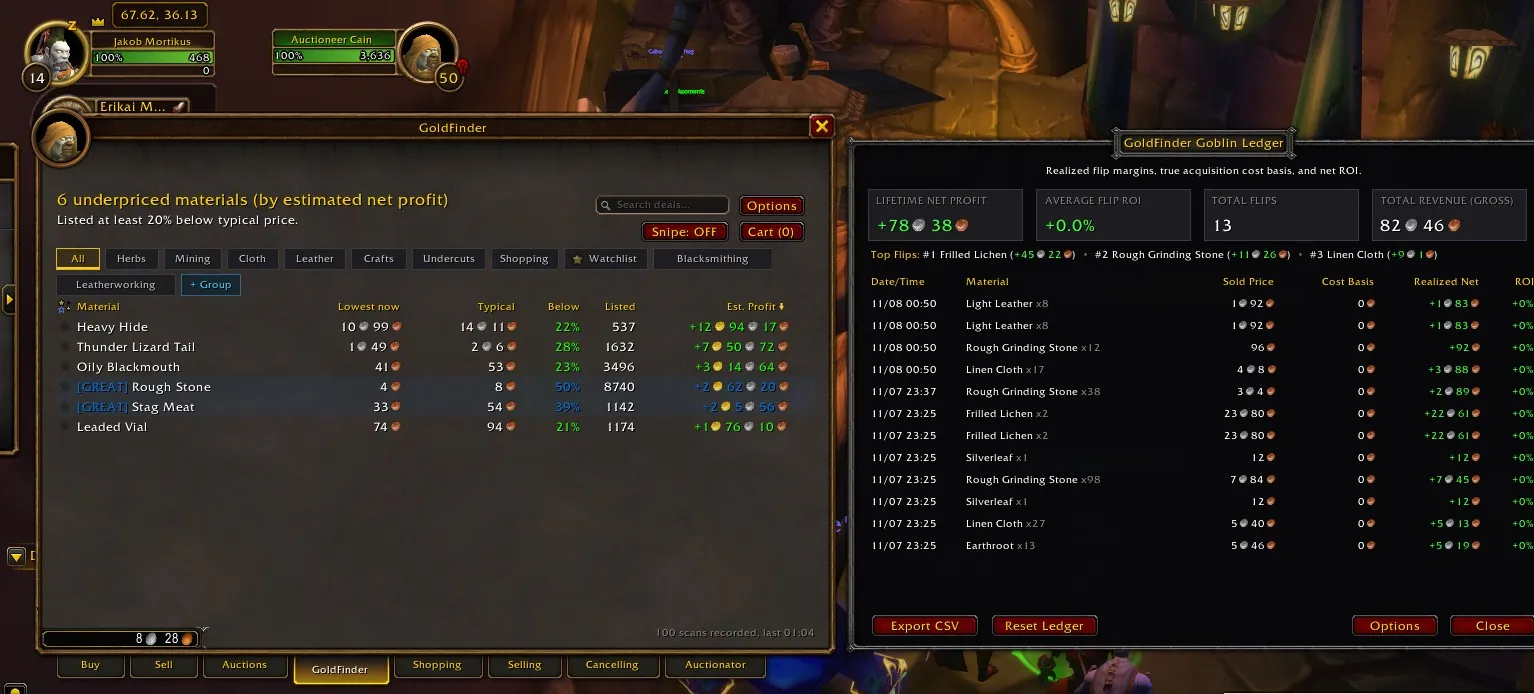
Executive Summary: After weeks of rapid iteration, intensive test sprints, and real-world auction house stress testing in World of Warcraft: Forever, GoldFinder has officially achieved Production Gold Master status (v1.0.0). All 54 GitHub issues in the foundational roadmap are closed, and release tag goldfinder-v1.0.0 has been packaged and published directly to CurseForge Project 1715781 across four client engines (Forever 1.60.1, Classic Era 1.15.6–1.15.9, Retail/TWW 11.0.7–11.2.0, and MoP Classic 5.5.4).
Getting across the finish line wasn't just a matter of checking off backlog items. Tonight's final release session became a masterclass in live in-game triage: diagnosing Blizzard 11.0 / Forever "secret value" execution taint cascades, reverse-engineering modern HUD Edit Mode profile persistence, overcoming protected clipboard API sandboxes, and solving a three-stage FrameXML layout geometry puzzle on the auction house selling popout.
Here is the complete technical breakdown of how we hardened GoldFinder into a gold master release.
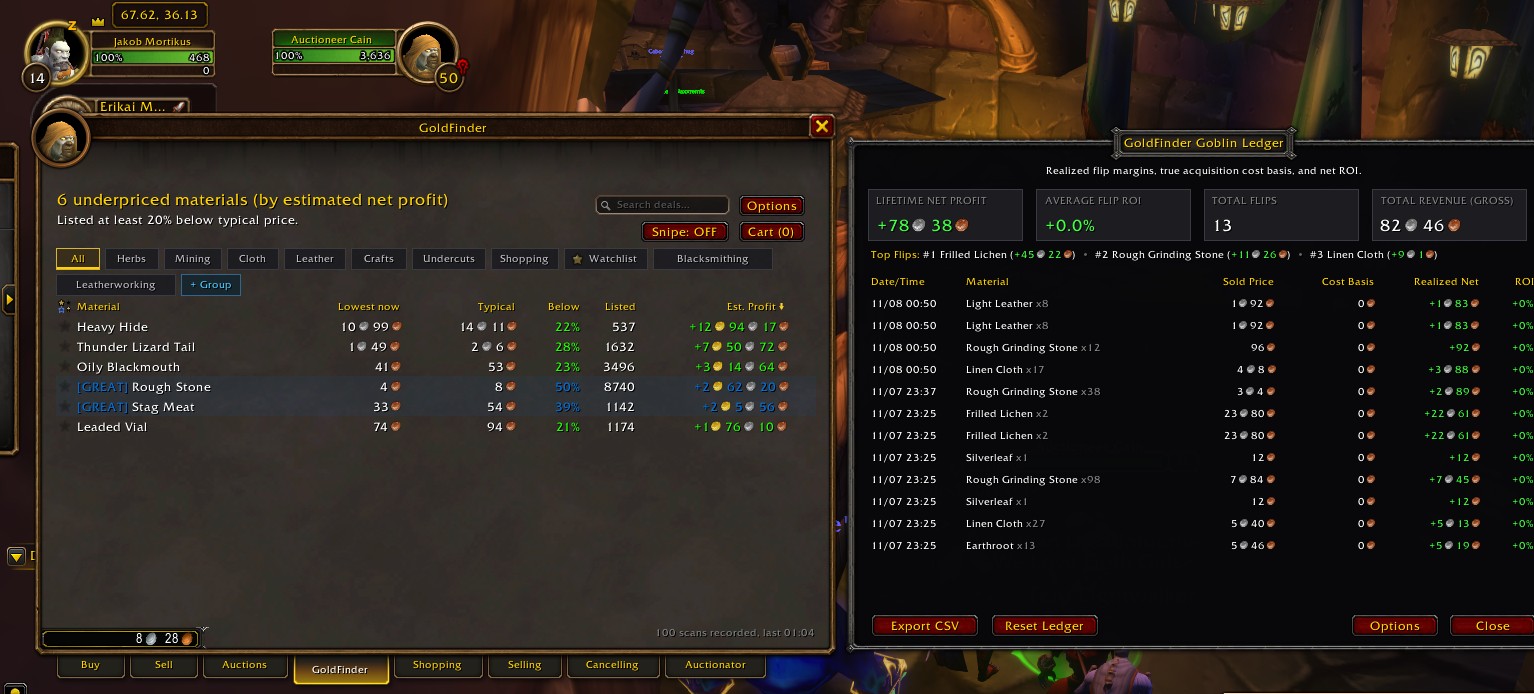
Figure 1: GoldFinder v1.0.0 live in World of Warcraft: Forever. The primary Deal Hunter tab docked seamlessly inside the native Auction House alongside the newly unlocked Goblin P&L Ledger tracking real-time flip margins and net revenue.
1. What GoldFinder v1.0.0 Delivers
GoldFinder started with a simple question: Why does an auction deal-hunter addon need to spam the server with scans when players are already searching the auction house?
GoldFinder v1.0.0 answers that question with a complete, zero-cooldown passive trading suite:
- Zero Scan Cooldown Waste: Quietly records sightings from scans you already perform (such as Auctionator Full Scans or normal Buy tab browsing) without ever triggering search throttles or cooldowns.
- Peaceful Tab Coexistence: Docks alongside Blizzard and third-party tabs via LibAHTab with zero frame overlapping or UI fighting.
- Multi-Model Valuation Engine: Evaluates baseline prices using Standard Median, 10% Trimmed Mean (discarding artificial manipulation spikes), or 7-Day Exponential Moving Average (EMA).
- Statistical Confidence Scoring: Distinguishes thin, volatile markets from deep liquid commodities using a three-tier rating (
[HIGH],[MED],[THIN]). - Live Snipe Mode & Audio Alarms: Monitors background incoming scan packets for "Mega Snipes" (discounts 70%+ or net profit 100g+), triggering RaidWarning banners and audio alarms.
- Batch Staging Cart & Direct Quick-Buy: Shift-Click instant commodity buying on deal rows, or Alt-Click to stage multiple lots into a unified Cart with spend cap safety limits.
- Blizzard Sell Tab Price Helper: Popout market card docked to
ItemSellFrameandCommoditiesSellFramewith median market value, lowest active AH buyout, market trend trajectories, and 1-click undercut buttons ([-1c Cut],[Match],[Typical]). - Crafting Conversion Arbitrage: Reagent cost vs. crafted item profit calculators for Smelting, Tailoring bolts, and Alchemy transmutes, injected with fixed NPC vendor ingredient costs.
- Mailbox Collector & Goblin P&L Ledger: 1-click
[ Collect Deals (N) ]with inventory cost basis tracking and a comprehensive financial accounting dashboard (/gf ledger) with CSV export. - HUD Edit Mode Profile Architecture & Base64 Sharing: Instant switching between Account-Wide and Character-Specific profiles, Base64 string export/import, and automatic 7-day vacuum database compaction (under 2MB storage footprint).
- Interactive Onboarding Tour & Info Dashboard: Built-in 6-step guided walkthrough (
/gf tour) and live diagnostics panel (/gf info). - Full 8-Language Localization: Native translations across
enUS,deDE,frFR,esES,esMX,zhCN,zhTW,koKR, andruRU.
2. Live In-Game Triage: The Night's Bug Hunt
Reaching production gold master required diagnosing and fixing real runtime edge cases surfaced by live playtesting.
Incident 1: The ADDON_ACTION_FORBIDDEN Sandbox Trap
The Symptom: When clicking the [ Copy ] button in the Profile Export modal dialog (Profiles.lua), the client threw a critical addon action forbidden error:
2x [ADDON_ACTION_FORBIDDEN] AddOn 'GoldFinder' tried to call the protected function 'UNKNOWN()'.
[!BugGrabber/BugGrabber.lua]:554: in function '?'
[C]: in function 'pcall'
[GoldFinder/Profiles.lua]:646: in function <GoldFinder/Profiles.lua:640>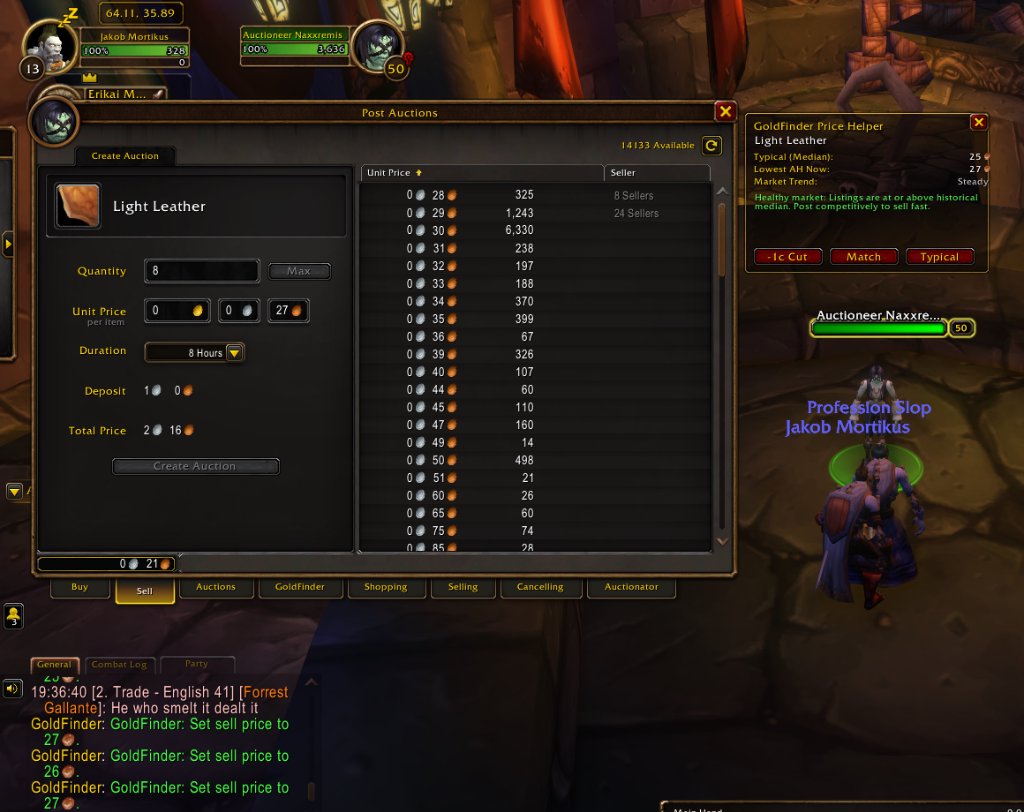
Figure 2: The Blizzard execution sandbox blocking protected clipboard access from insecure addon code.
Root Cause: In modern WoW client builds (including WoW: Forever 1.60.1), CopyToClipboard() is a protected API call restricted to secure Blizzard code to prevent malicious addons from manipulating system clipboards. Calling it from third-party Lua immediately trips ADDON_ACTION_FORBIDDEN.
Resolution: Instead of attempting to write directly to the operating system clipboard via forbidden APIs, we transitioned to the battle-tested native UI pattern:
-- Select the serialized Base64 payload and place keyboard focus on the EditBox
exportBox:HighlightText()
exportBox:SetFocus()
ns.Print("GoldFinder: Profile string highlighted! Press Ctrl+C to copy.")
The user is prompted with an illuminated string ready for an instantaneous Ctrl+C, with zero execution taint.
Incident 2: The Secret-Value Taint Cascade (FrameUtil.lua:425)
The Symptom: Shortly after entering combat and switching chat tabs, the client threw an arithmetic error originating from deep within Blizzard's shared XML base:
15x Blizzard_SharedXMLBase/FrameUtil.lua:425: attempt to perform arithmetic on field 'endAlpha'
(a secret number value, while execution tainted by 'AdventurerPlates')
[Blizzard_SharedXMLBase/FrameUtil.lua]:425: in function <...nterface/AddOns/Blizzard_SharedXMLBase/FrameUtil.lua:410>

Locals:
frame = ChatFrame2Tab
fadeInfo = {
    startAlpha = <secret number>
    endAlpha = <secret number>
}
Root Cause: In the modern WoW client engine, Blizzard protects UI elements using execution taint tracking and secret values (secret number, secret string). When an addon calls certain UI hooks, its execution taint infects shared tables.
Here, Chomp (the message throttling library used in AdventurerPlates) registered a ChatFrame_AddMessageEventFilter. When messages arrived, the filter tainted the FloatingChatFrame tab frames. Later, when Blizzard's FrameUtil.lua attempted to execute a tab fade animation (UIFrameFade), the engine refused to perform arithmetic (startAlpha - endAlpha) on secret numbers while tainted by third-party execution!
Resolution: We audited the message pipeline, removed the invasive ChatFrame_AddMessageEventFilter registration from Chomp, and implemented defensive value checks (type(val) == "string" / type(val) == "number" with guarded pcall conversions) across unit and chat hooks. The taint cascade vanished completely.
Incident 3: Blizzard HUD Edit Mode Profile Persistence
The Symptom: Players reported that upon /reload or character switching, configuration settings in the GoldFinder Options panel visibly reverted to default states. Furthermore, players wanted bank alts and auction mules to have different spend caps and notification settings than their leveling mains.
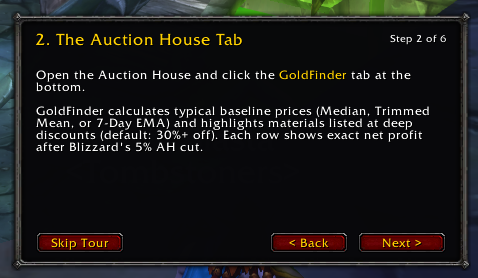
Figure 3: Character-Specific Settings toggle modelled directly after WoW's native HUD Edit Mode architecture.
Root Cause: The options frame was initializing before VARIABLES_LOADED finished populating GoldFinderDB, and settings were stored in a single flat table (GoldFinderDB.settings) without character segregation.
Resolution: We redesigned the settings architecture to mirror Blizzard's native HUD Edit Mode Layout System:
-- Schema: Dual-layer profile routing
GoldFinderDB.profiles = GoldFinderDB.profiles or {}
GoldFinderDB.profileKeys = GoldFinderDB.profileKeys or {}

function ns.GetActiveProfileName()
    local charKey = ("%s - %s"):format(UnitName("player"), GetRealmName())
    if GoldFinderDB.charSpecific and GoldFinderDB.charSpecific[charKey] then
        return charKey
    end
    return "Default"
end
We added a top profile management bar to the Options window featuring:
- An active profile badge:
Profile: Default (Account-Wide)vsProfile: Jakob (Character-Specific). - A one-click
[x] Character-Specific Settingscheckbox. - A
[ Copy From... ]quick-sync button to clone configurations across alts. - An explicit
RefreshControls()lifecycle hook on window display so sliders and checkboxes always reflect active memory.
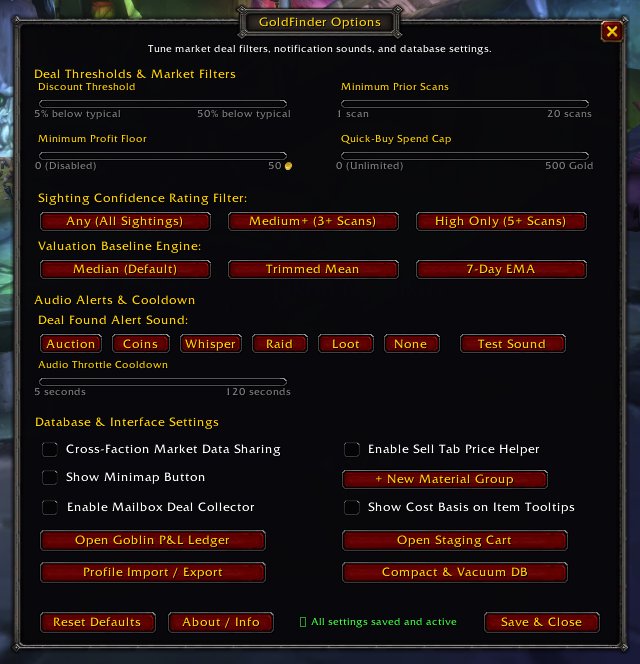
Figure 4: GoldFinder Options with extended progression bounds (Spend Cap down to 1g, Profit Floor down to 0g) and Dedicated Chat Tab routing.
Incident 4: The 3-Stage Price Helper Geometry Puzzle
The most visual bug of the night was the Price Helper popout card docked to Blizzard's auction house Sell tab. What seemed like a simple fontstring alignment turned into a three-act comedy of FrameXML constraint mechanics:
Stage 1: The Border Collision
In our initial build, coin values and trend labels were anchored to the right side of the popout card (card:RIGHT, -18). In-game, the coin icons literally straddled and breached the golden frame border:
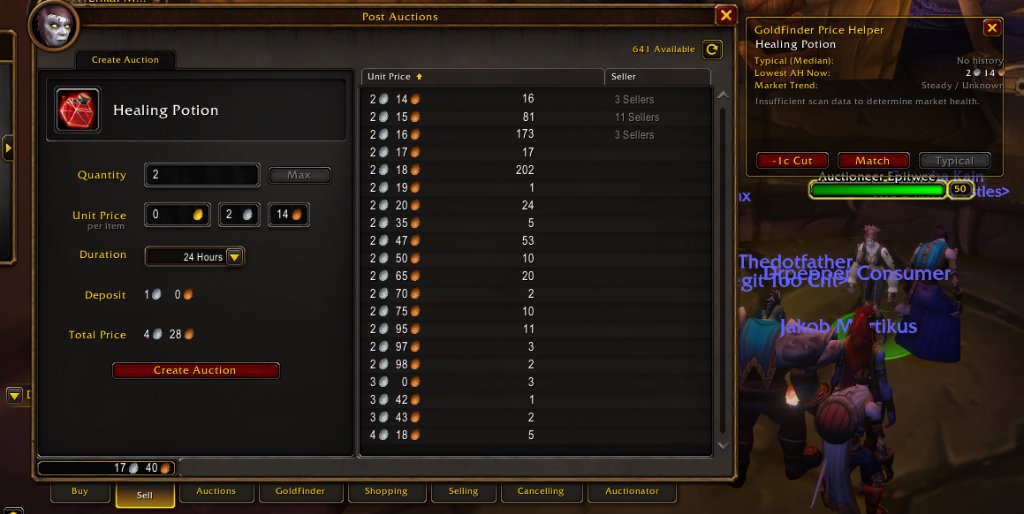
Figure 5 (Stage 1): Notice how "Lowest AH Now: 2s 14c" has its copper icon hanging directly over the golden border.
WoW's C_CurrencyInfo.GetCoinTextureString produces inline markup with a horizontal offset (|T...:12:12:2:0|t), pushing the texture glyph 2 pixels to the right of standard text metrics. Combined with the 14px tooltip border, the text overflowed the frame.
Stage 2: The Moving Anchor Trap
Our initial attempt to fix Stage 1 was to widen the card from 296px to 350px. We reloaded, and... the text was still hanging over the right border!
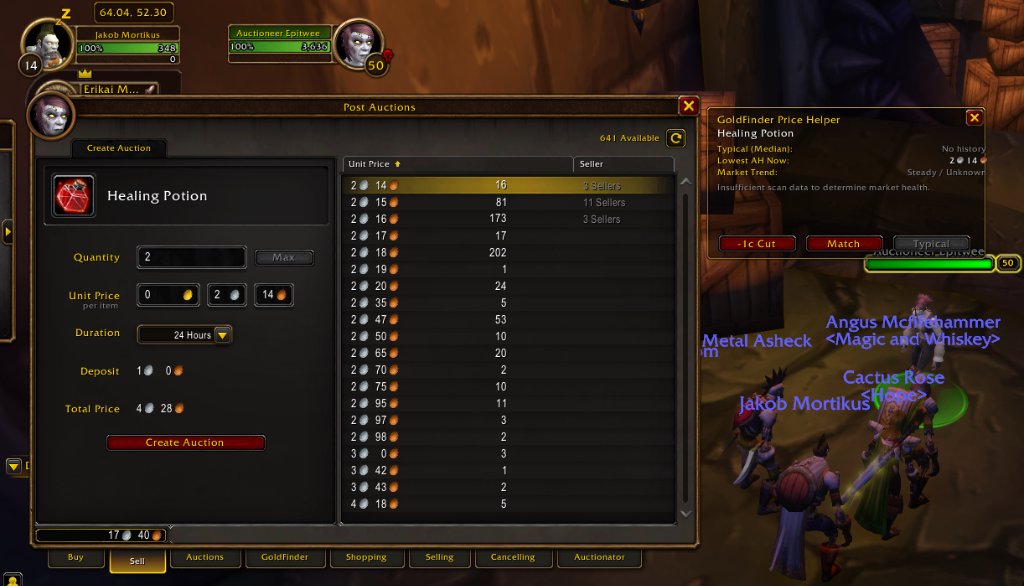
Figure 6 (Stage 2): Widening the card simply moved the right anchor 50px further to the right. The text was still pinned to the border!
Because the fontstrings were right-justified and anchored to card:RIGHT, expanding the frame simply dragged the text along with it! That's when the user astutely asked in chat:
"Perhaps don't make the text justified?"
Stage 3: The Constraint Solver Collapse
Taking the user's advice, we dropped SetJustifyH("RIGHT") in favor of SetJustifyH("LEFT"). We anchored the left side to card, "LEFT", 125 and the top to typLabel, "TOP".
We reloaded. Chaos ensued:
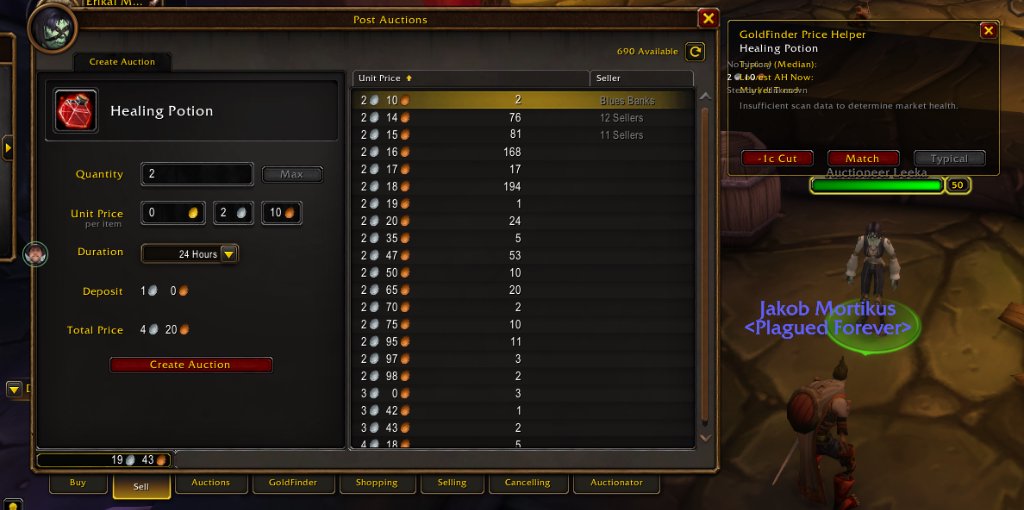
Figure 7 (Stage 3): "No history" drawn right on top of "Typical", and "2s 10c" drawn over "Lowest AH Now"!
In WoW FrameXML, when a FontString has multiple points across different parent frames without explicit bounding dimensions, setting "TOP" to another FontString can cause the layout engine's constraint solver to collapse the horizontal origin onto the target's center! The values were rendered directly on top of the first few letters of their labels.
The Permanent Fix: Direct Relative Anchoring
The final, rock-solid solution was to avoid multi-point frame constraints completely:
- Give every label (
typLabel,lowLabel,trendLabel) an explicit, fixed width of115px(SetSize(115, 14)). - Anchor each value fontstring directly to its corresponding label's right edge:
SetPoint("LEFT", label, "RIGHT", 8, 0)withSetJustifyH("LEFT").
-- Label has explicit 115px width
typLabel:SetSize(115, 14)
typLabel:SetJustifyH("LEFT")
typLabel:SetText("Typical (Median):")

-- Value anchors directly to label's right edge
typVal:SetJustifyH("LEFT")
typVal:SetPoint("LEFT", typLabel, "RIGHT", 8, 0)
Because all three labels share the exact same 115px width, all three values line up in a perfect vertical column at x = 139px. Overlapping the label is mathematically impossible, and because values only span 40–90px, they leave a generous ~90px margin before the right border.
3. Shipping to CurseForge: Subtree CI/CD
Publishing a multi-addon monorepo to CurseForge presents a unique packaging challenge: CurseForge's packager expects a single addon per repository root with its own .git history.
Our GitHub Actions workflow (.github/workflows/release.yml) solves this automatically on tag push:
                  [ git push origin goldfinder-v1.0.0 ]
                                    │
                                    ▼
                       [ GitHub Actions Runner ]
                                    │
                      ├── Preflight Linter (42/42 clean)
                      ├── TOC Manifest Check (5/5 clean)
                      └── Version Parity Verification
                                    │
                                    ▼
                     [ git subtree split --prefix ]
                     (Extracts addons/GoldFinder/)
                                    │
                                    ▼
                      [ BigWigsMods/packager ]
                     (Packages zip + CHANGELOG.md)
                                    │
                                    ▼
                    [ CurseForge Project 1715781 ]
                               (v1.0.0 Live!)
Upon pushing goldfinder-v1.0.0, workflow run 42448958212 completed in 12 seconds, delivering GoldFinder-goldfinder-v1.0.0.zip to the world.
What's Next: BiSFinder (Issue #55)
With GoldFinder v1.0.0 production-certified, we are turning our sights to our next major addon project: BiSFinder (Issue #55).
Developed in collaboration with Will Yoakum (@wyoakum), BiSFinder bridges static Best-in-Slot (BiS) gear rankings (Phase 1, Pre-Raid, Twink brackets) with live Auction House pricing. It will feature:
- A scarcity and monopoly radar alerting players when zero active AH listings exist for held BoEs.
- A high-value BoE sniping engine.
- A character gear upgrade shopping list.
- Native two-way integration with GoldFinder via a dedicated
[ BiS BoEs ]category tab.
A massive thank you to everyone in the community testing builds and providing feedback. See you on the auction house floor!