
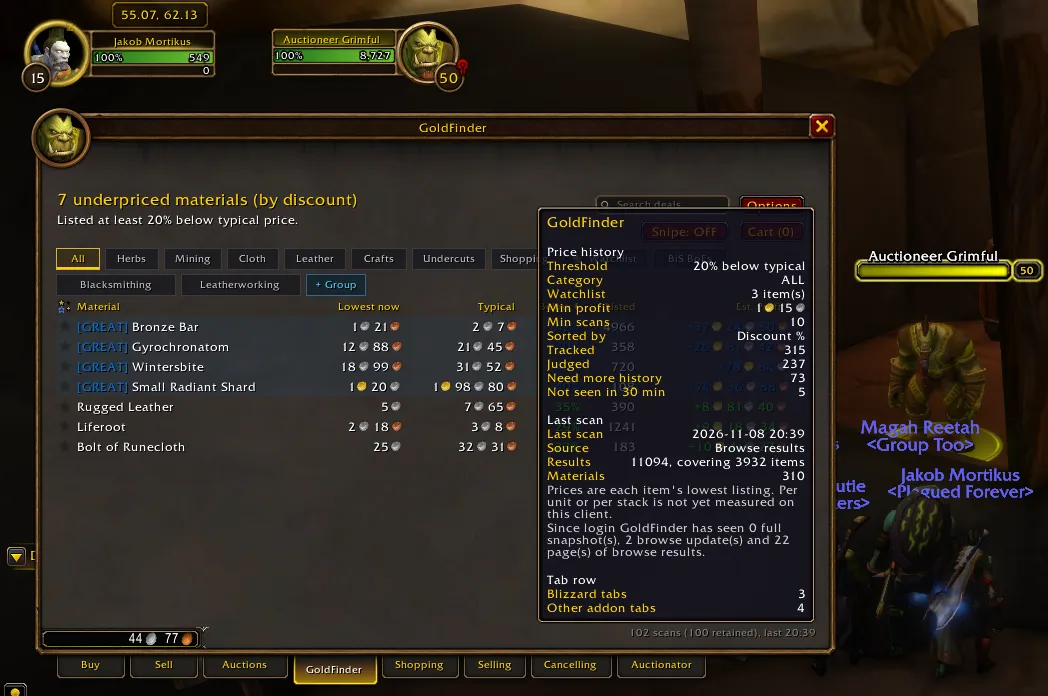
Executive Summary: Hot on the heels of yesterday's production release, today's engineering session with Google Antigravity shifted into aggressive field-hardening and live runtime triage. We tackled complex UI layering collisions, eliminated a subtle execution taint blocking bag interaction, built an in-game Diagnostic Vault for frictionless community support, and unraveled a multi-layered database mystery that capped recorded scans at exactly 100.
The result is GoldFinder v1.0.4, packaged and published to CurseForge Project 1715781 with 100% strict QA validation (0 Luacheck warnings, 54 passing unit tests).
Here is the deep technical log of what broke, why it broke, and how we solved it.
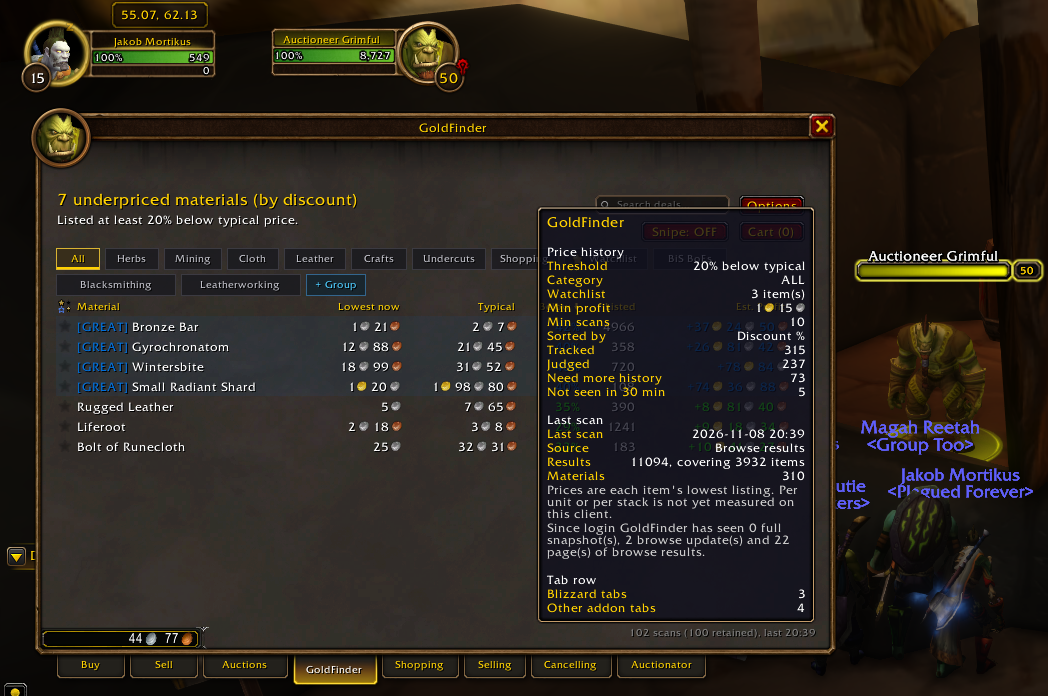
Figure 1: GoldFinder v1.0.4 live on WoW: Forever (CAMWOWUS1Realm3PvE). The footer telemetry now dynamically reports both total cumulative lifetime scans and the rolling retained buffer (102 scans, 100 retained), backed by full scan engine diagnostics.
1. Incident 1: The Dual-Helper Layering Collision
The Symptom
While testing the new Smart Buy Parity Advisor on the Auction House Sell tab, dropping an item like Linen Cloth into the selling slot triggered a severe UI collision: both the Sell Price Helper and the Smart Buy Parity Advisor attempted to dock simultaneously at the exact same anchor coordinates (TOPLEFT, AuctionHouseFrame, TOPRIGHT, 6, -10).
Neither card was draggable, meaning the user was forced to close the top card to see what was underneath. Furthermore, Unicode indicator emojis (💡, ⚠️, ✓) rendered as unprintable rectangular glyph boxes ([]) in WoW's native game fonts.
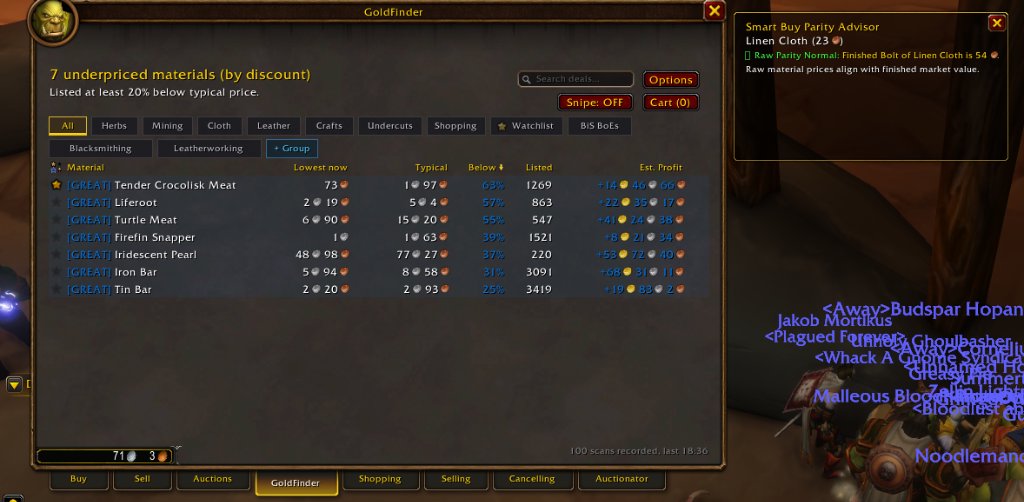
Figure 2: The dual-card collision. Dropping Linen Cloth into the Sell slot fired browse update events that woke BuyHelper on top of SellHelper, with broken font glyph boxes to the left of the parity alert.
Root Cause
When dropping a commodity into Blizzard's CommoditiesSellFrame, the client internally searches for market listings to display active price tiers. This fires the global event COMMODITY_SEARCH_RESULTS_UPDATED.
Because BuyHelper.lua registered COMMODITY_SEARCH_RESULTS_UPDATED to detect when a player was browsing commodities to buy, it had no awareness that the player was actually on the Sell tab. It assumed any commodity search update was an active purchasing intent, causing both cards to render on top of each other.
The Engineering Fix
We resolved this across four distinct steps:
-
Strict Context Validation (
IsBuyFrameActive):local function IsBuyFrameActive() if not AuctionHouseFrame or not AuctionHouseFrame:IsShown() then return false end if PanelTemplates_GetSelectedTab(AuctionHouseFrame) ~= 1 then return false end if CommoditiesSellFrame and CommoditiesSellFrame:IsVisible() then return false end if ItemSellFrame and ItemSellFrame:IsVisible() then return false end if CommoditiesBuyFrame and CommoditiesBuyFrame:IsVisible() then return true end if ItemBuyFrame and ItemBuyFrame:IsVisible() then return true end return false end -
Bidirectional Mutual Interlock: In
SellHelper.lua, whenever an item is dropped into the sell slot or active listings update, it explicitly callsns.HideBuyHelper(). -
Draggable Companion Cards: Both
GoldFinderBuyHelperCardandGoldFinderSellHelperCardwere granted full mouse dragging capabilities (EnableMouse(true),SetMovable(true),RegisterForDrag("LeftButton")), allowing players to reposition helper cards anywhere on their displays. -
Font Glyph Hygiene: All Unicode emojis were stripped and replaced with clean, colorized text tags matching Blizzard's UI aesthetics:
[Craft Alert],[Competitive],[Do Not Craft], and[Parity Normal].
2. Incident 2: The Container Bag Protected Action Taint
The Symptom
Right-clicking a bag item (specifically Waylaid Crate: Apprentice Herbs) with the Auction House open immediately triggered an execution sandbox violation caught by BugGrabber:
1x [ADDON_ACTION_FORBIDDEN] AddOn 'GoldFinder' tried to call the protected function 'UNKNOWN()'.
[!BugGrabber/BugGrabber.lua]:554: in function '?'
[C]: in function 'UseContainerItem'
[Blizzard_UIPanels_Game/Mainline/ContainerFrame.lua]:1611: in function <...s/Blizzard_UIPanels_Game/Mainline/ContainerFrame.lua:1503>
[C]: in function 'ContainerFrameItemButton_OnClick'
[Blizzard_UIPanels_Game/Mainline/ContainerFrame.lua]:1696: in function <...s/Blizzard_UIPanels_Game/Mainline/ContainerFrame.lua:1683>
Root Cause
In an earlier iteration of BuyHelper.lua, tab switching on the Auction House was tracked using:
hooksecurefunc("PanelTemplates_SetTab", function(frame, id) ... end)and:
tab:HookScript("OnClick", function() ... end)In World of Warcraft's FrameXML architecture, PanelTemplates_SetTab is a core utility function used across dozens of native frames—including ContainerFrame.lua (the player's inventory bags). Hooking a global FrameXML function or hooking scripts on Blizzard secure tab buttons tainted the call execution context. When the user right-clicked a bag item, the execution path traced through the tainted ContainerFrame stack down to UseContainerItem, which is a protected Blizzard C-function. The engine halted execution with ADDON_ACTION_FORBIDDEN.
The Engineering Fix
We completely eradicated the taint by replacing all global FrameXML hooks and button script hooks with non-tainting post-execution hooks on the AuctionHouseFrame itself:
-- Completely non-tainting display mode detection
if AuctionHouseFrame.SetDisplayMode then
    hooksecurefunc(AuctionHouseFrame, "SetDisplayMode", function(_, mode)
        if mode ~= 1 and mode ~= 2 then
            ns.HideBuyHelper()
        end
    end)
end
Zero global functions are touched, and bag interactions remain 100% secure.
3. Incident 3: The CurseForge Junction Desync Trap
During testing, we noticed that updates committed to the repo suddenly stopped reflecting in-game. Trace logging commands (/gf trace) failed to register.
Root Cause
At 17:35, the background CurseForge desktop client noticed that GoldFinder v1.0.3 was published on CurseForge. It executed an automated addon update. In doing so, it deleted the NTFS Junction symlink (F:\World of Warcraft\_forever_\Interface\AddOns\GoldFinder -> D:\Code\GitHub\wow-addons\addons\GoldFinder) and replaced it with a static folder extracted from the published zip!
We were editing live code in the repo, but the game was reading the static snapshot downloaded by the app.
The Fix
We nuked the static directory, re-established the live NTFS junction via cmd /c mklink /J, and toggled "Ignore Updates" for GoldFinder inside the CurseForge App settings. Live reload workflow restored!
4. Pillar 1: The In-Game Diagnostic Vault
Community bug reports for World of Warcraft addons are notoriously painful: "It's not working!" without realm names, client builds, enabled modules, or error logs.
To solve this permanently, we built Pillar 1: The In-Game Diagnostic Vault.
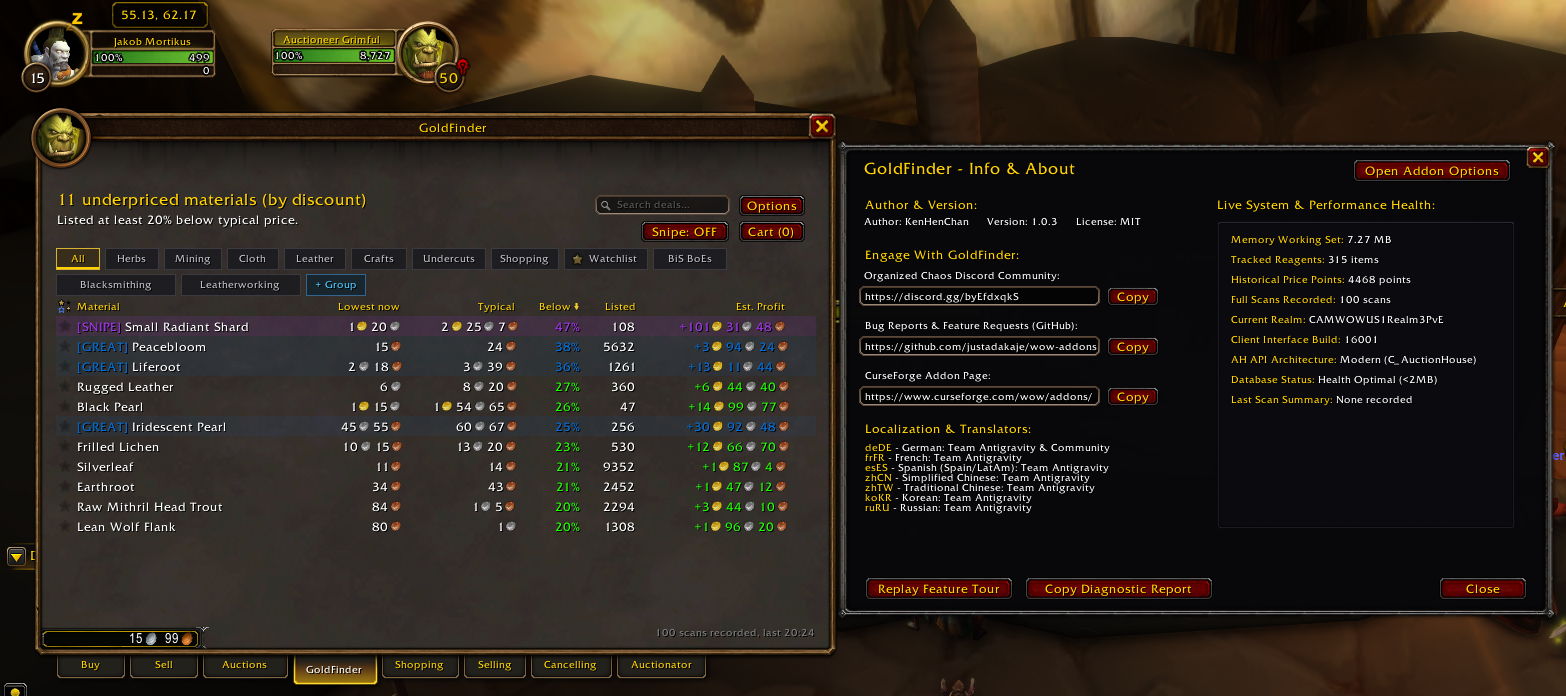
Figure 3: The new Info & Diagnostics screen featuring live system telemetry, database health, scan activity summaries, and a one-click [ Copy Diagnostic Report ] action.
Standardized Markdown Telemetry
Typing /gf diag or /gf report (or clicking [ Copy Diagnostic Report ] in the Info dashboard) generates an instant, standardized markdown support payload ready to paste directly into GitHub Issues or Discord:
### GoldFinder Diagnostic & Support Report
- **Generated:** 2026-11-08 20:39:15
- **Addon:** GoldFinder v1.0.4 (Author: KenHenChan)
- **Client:** WoW 1.60.1 (Build 70862, Date Nov  6 2026, Interface 16001, Locale enUS)
- **Player:** Jakob (Level 15 WARRIOR, Faction: Horde)
- **Realm:** CAMWOWUS1Realm3PvE
- **Memory Footprint:** 5.12 MB
- **Database:** 315 items tracked, 4468 price points, 102 scans recorded (100 retained in rolling buffer) (Last: 2026-11-08 20:39 (Browse, 310 materials, 11094 rows))
- **Scan Engine Activity:** Since login GoldFinder has seen 0 full snapshot(s), 2 browse update(s) and 22 page(s) of browse results.
- **Active Profile:** Default (Account-Wide)
- **Thresholds:** Discount: 20%, MinPrior: 10, MinProfit: 1g 15s 0c, SpendCap: 70g 0s 0c
- **Engine Settings:** Confidence: HIGH, ValuationModel: EMA, FactionShare: ON
- **Modules:** Sound: ON (60s throttle), ChatTab: ON, Tooltip: ON, SellHelper: ON, BuyHelper: ON, MailCollector: ON, CostBasis: ON
- **AH State:** IsShown=true, SelectedTab=1
- **Recent Trapped Errors:** None recorded (Clean execution)
We also integrated a circular error-trapping buffer (ns.lastErrors) in Core.lua so any caught execution exceptions are automatically included in the report.
5. Incident 4: The 100-Scan Database Ceiling Mystery
Immediately after deploying the Diagnostic Vault, our live testing hit an unexpected puzzle:
"I've noticed that my DB seems to have stopped at 100 scans recorded. I've been continuously triggering an Auctionator Full Scan multiple times throughout this session. And Last Scan Summary says 'None recorded'!"
Investigation revealed three separate issues intersecting to create this exact illusion:
1. The Hardcoded FIFO Ring Buffer (CAPTURES_KEPT = 100)
In Scan.lua:
local CAPTURES_KEPT = 100
...
db.scans[#db.scans + 1] = summary
while #db.scans > CAPTURES_KEPT do table.remove(db.scans, 1) end
db.scans was intentionally capped at 100 entries to prevent SavedVariables file bloat. Whenever scan #101 arrived, scan #1 was discarded. Because #db.scans was permanently 100 once full, and GoldFinder never tracked lifetime scans, the displayed count appeared frozen in time.
2. The Missing status Property
In Info.lua:
local lastScan = (ns.ScanStatus and ns.ScanStatus().status) or "None recorded"In Scan.lua, ns.ScanStatus() returned { footer = ..., lines = ..., warn = ... }—without a status field. As a result, st.status was always nil, defaulting to "None recorded" even with 100 scans saved in the table!
3. The Timestamp-Agnostic Fingerprint Drop
In Scan.lua:
local fingerprint = ("%d:%d:%.0f:%.0f"):format(totalRows, c.distinctItems, c.fpPrice or 0, c.fpQty or 0)
if fingerprint == db.lastFingerprint then
    diag.duplicates = diag.duplicates + 1
    return
end
To prevent rapid Selling tab clicks from reprocessing cached browse lists, scans with identical fingerprints were dropped.
On a quiet beta realm (CAMWOWUS1Realm3PvE) where no other players bought or listed auctions between scans, two full scans 20 minutes apart produced the exact same row count, item count, price sum, and quantity sum. Because the check had no timestamp expiry, the second scan was silently discarded as a duplicate!
The Multi-Tiered Fix
- Added
db.lifetimeScans: We now track cumulative lifetime scans across the life of the database while preserving the 100-entry rolling summary buffer for memory hygiene. - Time-Aware Deduplication: Replicate full snapshots are now only debounced if within 60 seconds of another snapshot. Browse tab echoes are debounced within the 10-minute sighting window. Any scan executed after 60 seconds is always processed and recorded!
- Rich
st.statusMetadata:ns.ScanStatus()now returns complete temporal and category metadata:2026-11-08 20:39 (Browse, 310 materials, 11094 rows).
Once deployed, the live tooltip immediately advanced to 102 scans (100 retained), last 20:39!
6. UI Refinements & Future Roadmap

Figure 4: The profile bar layout bug. Anchoring to the right margin caused the label to spill 150px into mid-air outside the frame border.
- Profile Bar Label Overflow: In
Config.lua, the checkbox was anchored toRIGHT, profPanel, -8, 0, causing its label"Character-Specific Settings"to spill past the window border. We now dynamically measure string width viaGetStringWidth()and offset the checkbox anchor accordingly (-(textWidth + 12)). - Author Attribution: Updated addon metadata and about screens to officially reflect
KenHenChan. - Hybrid Settings Architecture (Issue #58): We logged Issue #58 to embed native lightweight controls directly inside Blizzard's
Game Options > AddOns > GoldFindertab, eliminating the redirect popout for basic threshold toggles.
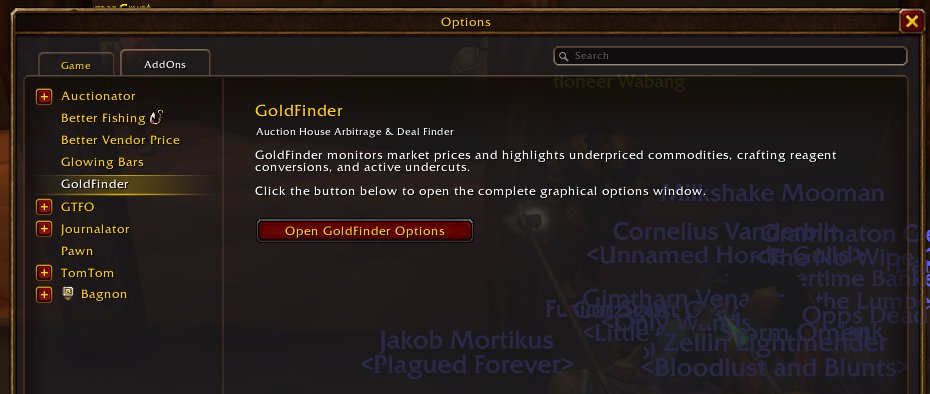
Figure 5: The current Game Options > AddOns tab redirecting to the options window—slated for full native embedded settings in Issue #58.
7. Release Verification Summary
Before publishing release tag goldfinder-v1.0.4, we ran our strict automated test pipeline:
.\scripts\run-tests.ps1 -Strict======================================================
World of Warcraft Addon QA & Test Runner
======================================================
1. Running Luacheck Static Analysis...
Total: 0 warnings / 0 errors in 44 files
✓ Luacheck passed: 0 warnings, 0 errors.
2. Running Busted Unit Tests...
54 successes / 0 failures / 0 errors / 0 pending : 0.991654 seconds
✓ All unit tests passed cleanly.
QA SUITE PASSED!GoldFinder v1.0.4 is live on CurseForge and ready for action. Happy hunting on the auction house!